
Thursday, July 6, 2017
DIsks GPT vs MBR
A partition
structure defines how information is structured on the partition, where
partitions begin and end, and also the code that is used during startup
if a partition is bootable.

Thursday, July 21, 2016
Wednesday, September 25, 2013
how to change root password mysql
# /etc/init.d/mysqld stop
# /usr/bin/mysqld_safe --skip-grant-tables --skip-networking &
# mysql -u root
mysql> use mysql;
mysql> UPDATE user SET Password=PASSWORD("your password here") WHERE User="root";
mysql> exit
# /etc/init.d/mysqld stop
# /etc/init.d/mysqld start
# /usr/bin/mysqld_safe --skip-grant-tables --skip-networking &
# mysql -u root
mysql> use mysql;
mysql> UPDATE user SET Password=PASSWORD("your password here") WHERE User="root";
mysql> exit
# /etc/init.d/mysqld stop
# /etc/init.d/mysqld start
Friday, September 6, 2013
Cisco switch port in err disabled , how to recover
go to the specific port configuration mode.
disable port security , disable and enable
acc-sw-2960-48p-svr-(config-if)#no switchport port-security
acc-sw-2960-48p-svr-(config-if)#shutdown
acc-sw-2960-48p-svr-(config-if)#no shutdown
disable port security , disable and enable
show port 0/19 will show state
Port  Name               Status     Vlan       Level  Duplex Speed Type
----- ------------------ ---------- ---------- ------ ------ ----- ------------
0/19              errdisable   1 normal   auto  auto 10/100BaseTX
acc-sw-2960-48p-svr-(config-if)#no switchport port-security
acc-sw-2960-48p-svr-(config-if)#shutdown
acc-sw-2960-48p-svr-(config-if)#no shutdown
Monday, July 29, 2013
Tuesday, July 23, 2013
Sunday, June 16, 2013
Fix yum error CentOS linux : Error: file is encrypted or is not a database
Error: file is encrypted or is not a database
[sameera@gemini test2]$ sudo yum clean
Loaded plugins: fastestmirror, refresh-packagekit, security
Error: clean requires an option: headers, packages, metadata, dbcache, plugins, expire-cache, rpmdb, all
[sameera@gemini test2]$ sudo yum clean all
Loaded plugins: fastestmirror, refresh-packagekit, security
Cleaning repos: base epel extras linuxtech-release rpmforge updates
Cleaning up Everything
[sameera@gemini test2]$ sudo yum clean
Loaded plugins: fastestmirror, refresh-packagekit, security
Error: clean requires an option: headers, packages, metadata, dbcache, plugins, expire-cache, rpmdb, all
[sameera@gemini test2]$ sudo yum clean all
Loaded plugins: fastestmirror, refresh-packagekit, security
Cleaning repos: base epel extras linuxtech-release rpmforge updates
Cleaning up Everything
Tuesday, April 16, 2013
PPTP VPN server Linux
Step 1. Install PPTPD
If your OS is CentOS/RedHat 5:
Step 6. Configure firewall
If you are using CSF firewall, you may refer to this post on firewall settings.
Step 7. Start PPTP VPN server
If your OS is CentOS or Redhat, using the following command:
If your OS is Ubuntu, you just reboot your machine.
Now you can test the VPN server from any client: Windows PCs, Linux PCs, Android phones/tablets, or iPhone and iPad.
The log of the VPN server, by default, is combined with system log located at /var/log/messages.
If your OS is CentOS/RedHat 5:
If your OS is CentOS/RedHat 6:yum install ppp
cd /usr/local/src
wget http://poptop.sourceforge.net/yum/stable/packages/pptpd-1.3.4-2.rhel5.x86_64.rpm
rpm -Uhv pptpd-1.3.4-2.rhel5.x86_64.rpm
If you are using Ubuntu:yum install ppp
cd /usr/local/src
wget http://poptop.sourceforge.net/yum/stable/packages/pptpd-1.3.4-2.el6.x86_64.rpm
rpm -Uhv pptpd-1.3.4-2.el6.x86_64.rpm
apt-get install pptpd
Step 2. Edit IP setttings in /etc/pptpd.confvi /etc/pptpd.conflocalip 192.168.0.1Step 3. Add user account in/etc/ppp/chap-secrets (assign username and password)
remoteip 192.168.0.101-200
vi /etc/ppp/chap-secretsusernameForuser1 * setpassword1here *Step 4. Optional settings in /etc/ppp/options.pptpd
usernameForuser2 * setpassword2here *
vi /etc/ppp/options.pptpdms-dns 8.8.8.8Step 5. Enable network forwarding in /etc/sysctl.conf
ms-dns 4.4.4.4
vi /etc/sysctl.confnet.ipv4.ip_forward = 1use the following command to apply the change:
sysctl -pStep 6. Configure firewall
iptables -A INPUT -i eth0 -p tcp --dport 1723 -j ACCEPTiptables -A INPUT -i eth0 -p gre -j ACCEPTiptables -t nat -A POSTROUTING -o eth0 -j MASQUERADEiptables -A FORWARD -i ppp+ -o eth0 -j ACCEPTiptables -A FORWARD -i eth0 -o ppp+ -j ACCEPTservice iptables saveservice iptables restartIf you are using CSF firewall, you may refer to this post on firewall settings.
Step 7. Start PPTP VPN server
If your OS is CentOS or Redhat, using the following command:
service pptpd restartTo start PPTP Daemon automatically when rebooting next time, use command:
chkconfig pptpd onIf your OS is Ubuntu, you just reboot your machine.
Now you can test the VPN server from any client: Windows PCs, Linux PCs, Android phones/tablets, or iPhone and iPad.
The log of the VPN server, by default, is combined with system log located at /var/log/messages.
Monday, April 8, 2013

Wednesday, February 6, 2013
How to recover cisco switch port from err-disable state
Port is in err-disable state? And you don't know what to do?
switch01#show int G1/0/19
GigabitEthernet1/0/19 is down, line protocol is down (err-disabled)
Find out the main reason for err-disable state. In our case it is port security violation on port Gi1/0/19.
#show interfaces status err-disabled
Port      Name               Status       Reason
Gi1/0/19  SERVER01    err-disabled psecure-violation
Gi1/0/46                     err-disabled psecure-violation
Gi2/0/12                     err-disabled psecure-violation
Fix port configuration:
int G1/0/19
 no switchport port-security
 shut
 no shut
Wednesday, January 30, 2013
activate windows 7 command line
- Open up an elevated command prompt.
- Enter the following
slmgr -ipk your-mak-key-here

slmgr -ato
Monday, August 6, 2012
vi / vim show line number command
To display line numbers along the left side of a window, type any one of the following:
or
:set numberor
:set nu
(Fig.01: Vi / Vim line numbers in action - click to enlarge image)
To turn off line number again enter the same command:
:set nu!If you need number every time you start vi/vim, append following line to your ~/.vimrc file:
set numberHow to forward mail to an external email address
In Exchange Server 2003, mail for a recipient can be forwarded to an alternate recipient by modifying the recipient’s Delivery Options in ADUC | recipient -> properties | Exchange General tab.
Figure 1: Use Delivery Options to auto forward email to an alternate recipient in Exchange 2003
Forwarding mail to an external address in Exchange 2010 and Exchange 2007 Create a MailContact
 Forward mail for a recipient to the MailContact
Automatic forwarding and Remote Domains
Figure 3: The Allow automatic forward setting for remote domains only impacts client-side automatic forwarding using mechanisms like Inbox Rules, and is disabled by default.
Figure 1: Use Delivery Options to auto forward email to an alternate recipient in Exchange 2003
Forwarding mail to an external address in Exchange 2010 and Exchange 2007
Create a MailContact- Expand Recipeint Configuration | Mail Contact
- In the Action pane, click New Mail Contact
- To create a new Contact object, leave the default (New Contact) selected | click Next
- Type First name, Last name
- Click Edit to add the external email address
- Click New to complete creation of new MailContact
Forward mail for a recipient to the MailContact- Expand Recipeint Configuration | Mailbox | select mailbox | properties | Mail Flow Settings tab | Delivery Options
- Under Forwarding address, select Forward to
- Click Browse to select the MailContact
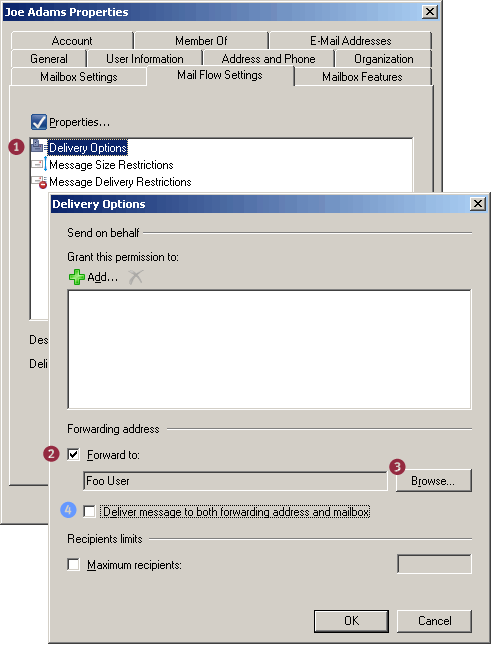
- Figure 2: Modifying Delivery Options to forward email to an alternate recipient
- Optional: If a copy of the message needs to be delivered to both the external recipient and the original recipient’s mailbox, select the Deliver message to both forwarding address and mailbox
Automatic forwarding and Remote Domains
Figure 3: The Allow automatic forward setting for remote domains only impacts client-side automatic forwarding using mechanisms like Inbox Rules, and is disabled by default.

If you need to forward mail to an external email address, you can’t simply type the address in theForward to: field on the Delivery Options page. A (mail-enabled) Contact needs to be created in ADfirst, and Delivery Options modified to point to the Contact.
In Exchange 2010/2007, these tasks remain the same. However, instead of using ADUC to accomplish them, you use the EMC or the Shell (aka “EMS“). The new term for a Contact is MailContact.
Create a MailContact using the EMC:
Alternatively, use the Shell to create a new MailContact:
New-MailContact -Name “Foo User” -ExternalEmailAddress “foo@externaldomain.com
Next, we set the recipient’s Delivery Options to deliver to the alternate recipient.
Now that we have a MailContact created for the external recipient’s email address, we can forward mail for the Exchange recipient to the MailContact. To configure mail forwarding using the EMC:
To configure mail forwarding using the Shell:
Set-Mailbox “Joe Adams” -ForwardingAddress “foo@externaldomain.com”
To deliver a copy to the mailbox (in addition to the external email address – equivalent of step 4 above):
Set-Mailbox “Joe Adams” -ForwardingAddress “foo@externaldomain.com” -DeliverToMailboxAndForward $true
This command lists mailboxes with auto forwarding enabled:
Get-Mailbox | where {$_.ForwardingAddress -ne $null} | ft name,forwardingaddress
Remote Domains define a bunch of settings, such as message formats, character sets, and OOFSfor messages sent to specified domains outside your Exchange organization. The default Remote Domain setting for the address space * (the asterisk character) applies to all external domainsexcept the ones for which you’ve created a Remote Domain for.
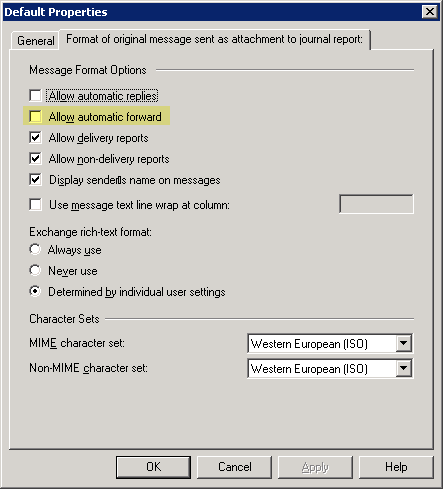
The Allow automatic forward setting for remote domains applies only to client-side forwardingusing mechanisms like Inbox Rules. For instance, if a user creates a rule in Microsoft Outlook to automatically forward mail to an external email address, the default setting (for address space *) doesn’t allow it. To enable automatic client-side forwarding of mail to external addresses, select the Allow automatic forward checkbox in a remote domain’s properties | Format of original message sent as attachment to journal report tab (Yes, in Exchange 2007 the tab is mislabeled. It is the “Message Formats” tab… :).
Server-side email forwarding configured by an administrator, as shown in this post, is not impacted by this setting.
Monday, June 11, 2012
Trick to install vCenter Server 5.0 on windows 7
http://mytricks.in/2011/08/how-to-install-vmware-vcenter-server-5.html
Monday, October 17, 2011
Remove My Documents from the Desktop
Windows 95, 98 and Me
[HKEY_CURRENT_USER\Software\Classes\CLSID\{450D8FBA-AD25-11D0-98A8-0800361B1103}\ShellFolder]
Windows NT, 2000 and XP
[HKEY_CURRENT_USER\Software\Microsoft\Windows\CurrentVersion\Explorer\CLSID\{450D8FBA-AD25-11D0-98A8-0800361B1103}\ShellFolder]
Modify the value called "Attributes" and set it to either "0xf0500174" to hide or "0xf0400174" to display My Documents.
Click on a blank area of desktop and press F5 to refresh for the change to take effect.
Note: This tweak can also by used on a system wide basis by entering the same values under the [HKEY_LOCAL_MACHINE] hive.
[HKEY_CURRENT_USER\Software\Classes\CLSID\{450D8FBA-AD25-11D0-98A8-0800361B1103}\ShellFolder]
Windows NT, 2000 and XP
[HKEY_CURRENT_USER\Software\Microsoft\Windows\CurrentVersion\Explorer\CLSID\{450D8FBA-AD25-11D0-98A8-0800361B1103}\ShellFolder]
Modify the value called "Attributes" and set it to either "0xf0500174" to hide or "0xf0400174" to display My Documents.
Click on a blank area of desktop and press F5 to refresh for the change to take effect.
Note: This tweak can also by used on a system wide basis by entering the same values under the [HKEY_LOCAL_MACHINE] hive.
 |
 |  |  |  |  | |
|  | (Default) | REG_SZ | (value not set) | |
|  | Attributes | REG_DWORD | 0xf0500174 (4031775092) | |
 | ||
| HKEY_CURRENT_USER\Software\Microsoft\Windows\CurrentVersion\... |  |
Wednesday, October 5, 2011

Tuesday, October 4, 2011
EIGRP configuration example for CCNA

eigrp configuration
R1
R1(config)#router eigrp ?
<1-65535> Autonomous system number
R1(config)#router eigrp 1
R1(config-router)#network 172.16.0.0
R1(config-router)#network 192.168.10.0
R1(config-router)#
%DUAL-5-NBRCHANGE: IP-EIGRP 1: Neighbor 172.16.3.2 (Serial0/0/0) is up: new adjacency
R2
R2(config-router)#ne
R2(config-router)#network 172.16.0.0
R2(config-router)#
%DUAL-5-NBRCHANGE: IP-EIGRP 1: Neighbor 172.16.3.1 (Serial0/0/0) is up: new adjacency
network 192.168.10.0
R2(config-router)#
R3
R3(config)#router eigrp 1
R3(config-router)#network 192.168.0.0 < not worked : enter classfull n/w
R3(config-router)#network 192.168.10.0
R3(config-router)#
%DUAL-5-NBRCHANGE: IP-EIGRP 1: Neighbor 192.168.10.9 (Serial0/0/0) is up: new adjacency
%DUAL-5-NBRCHANGE: IP-EIGRP 1: Neighbor 192.168.10.5 (Serial0/0/1) is up: new adjacency
R3(config-router)#network 192.168.1.0
<1-65535> Autonomous system number
R1(config)#router eigrp 1
R1(config-router)#network 172.16.0.0
R1(config-router)#network 192.168.10.0
R1(config-router)#
%DUAL-5-NBRCHANGE: IP-EIGRP 1: Neighbor 172.16.3.2 (Serial0/0/0) is up: new adjacency
R2
R2(config-router)#ne
R2(config-router)#network 172.16.0.0
R2(config-router)#
%DUAL-5-NBRCHANGE: IP-EIGRP 1: Neighbor 172.16.3.1 (Serial0/0/0) is up: new adjacency
network 192.168.10.0
R2(config-router)#
R3
R3(config)#router eigrp 1
R3(config-router)#network 192.168.0.0 < not worked : enter classfull n/w
R3(config-router)#network 192.168.10.0
R3(config-router)#
%DUAL-5-NBRCHANGE: IP-EIGRP 1: Neighbor 192.168.10.9 (Serial0/0/0) is up: new adjacency
%DUAL-5-NBRCHANGE: IP-EIGRP 1: Neighbor 192.168.10.5 (Serial0/0/1) is up: new adjacency
R3(config-router)#network 192.168.1.0
R3#sh ip route
Codes: C - connected, S - static, I - IGRP, R - RIP, M - mobile, B - BGP
D - EIGRP, EX - EIGRP external, O - OSPF, IA - OSPF inter area
N1 - OSPF NSSA external type 1, N2 - OSPF NSSA external type 2
E1 - OSPF external type 1, E2 - OSPF external type 2, E - EGP
i - IS-IS, L1 - IS-IS level-1, L2 - IS-IS level-2, ia - IS-IS inter area
* - candidate default, U - per-user static route, o - ODR
P - periodic downloaded static route
Gateway of last resort is not set
172.16.0.0/16 is variably subnetted, 3 subnets, 2 masks
D 172.16.0.0/16 [90/540160] via 192.168.10.9, 00:01:11, Serial0/0/0
[90/540160] via 192.168.10.5, 00:01:11, Serial0/0/1
D 172.16.1.0/24 [90/2684416] via 192.168.10.9, 00:01:11, Serial0/0/0
D 172.16.2.0/24 [90/2684416] via 192.168.10.5, 00:01:11, Serial0/0/1
192.168.1.0/24 is variably subnetted, 2 subnets, 2 masks
D 192.168.1.0/24 is a summary, 00:01:08, Null0
C 192.168.1.0/29 is directly connected, FastEthernet0/0
192.168.10.0/24 is variably subnetted, 3 subnets, 2 masks
D 192.168.10.0/24 is a summary, 00:01:08, Null0
C 192.168.10.4/30 is directly connected, Serial0/0/1
C 192.168.10.8/30 is directly connected, Serial0/0/0
R3#
------------------------------------------------------------------------------------------------------
Codes: C - connected, S - static, I - IGRP, R - RIP, M - mobile, B - BGP
D - EIGRP, EX - EIGRP external, O - OSPF, IA - OSPF inter area
N1 - OSPF NSSA external type 1, N2 - OSPF NSSA external type 2
E1 - OSPF external type 1, E2 - OSPF external type 2, E - EGP
i - IS-IS, L1 - IS-IS level-1, L2 - IS-IS level-2, ia - IS-IS inter area
* - candidate default, U - per-user static route, o - ODR
P - periodic downloaded static route
Gateway of last resort is not set
172.16.0.0/16 is variably subnetted, 3 subnets, 2 masks
D 172.16.0.0/16 [90/540160] via 192.168.10.9, 00:01:11, Serial0/0/0
[90/540160] via 192.168.10.5, 00:01:11, Serial0/0/1
D 172.16.1.0/24 [90/2684416] via 192.168.10.9, 00:01:11, Serial0/0/0
D 172.16.2.0/24 [90/2684416] via 192.168.10.5, 00:01:11, Serial0/0/1
192.168.1.0/24 is variably subnetted, 2 subnets, 2 masks
D 192.168.1.0/24 is a summary, 00:01:08, Null0
C 192.168.1.0/29 is directly connected, FastEthernet0/0
192.168.10.0/24 is variably subnetted, 3 subnets, 2 masks
D 192.168.10.0/24 is a summary, 00:01:08, Null0
C 192.168.10.4/30 is directly connected, Serial0/0/1
C 192.168.10.8/30 is directly connected, Serial0/0/0
R3#
------------------------------------------------------------------------------------------------------
DISABLING AUTOSUMMARIZATION
R3(config-router)#no auto-summary
%DUAL-5-NBRCHANGE: IP-EIGRP 1: Neighbor 192.168.10.5 (Serial0/0/1) is up: new adjacency
%DUAL-5-NBRCHANGE: IP-EIGRP 1: Neighbor 192.168.10.9 (Serial0/0/0) is up: new adjacency
R3(config-router)#
R3(config-router)#^Z
R3#
%SYS-5-CONFIG_I: Configured from console by console
R3#sh ip route
Codes: C - connected, S - static, I - IGRP, R - RIP, M - mobile, B - BGP
D - EIGRP, EX - EIGRP external, O - OSPF, IA - OSPF inter area
N1 - OSPF NSSA external type 1, N2 - OSPF NSSA external type 2
E1 - OSPF external type 1, E2 - OSPF external type 2, E - EGP
i - IS-IS, L1 - IS-IS level-1, L2 - IS-IS level-2, ia - IS-IS inter area
* - candidate default, U - per-user static route, o - ODR
P - periodic downloaded static route
Gateway of last resort is not set
172.16.0.0/16 is variably subnetted, 3 subnets, 2 masks
D 172.16.1.0/24 [90/540160] via 192.168.10.5, 00:00:25, Serial0/0/1
D 172.16.2.0/24 [90/540160] via 192.168.10.9, 00:00:25, Serial0/0/0
D 172.16.3.0/30 [90/2681856] via 192.168.10.5, 00:00:25, Serial0/0/1
[90/2681856] via 192.168.10.9, 00:00:25, Serial0/0/0
192.168.1.0/29 is subnetted, 1 subnets
C 192.168.1.0 is directly connected, FastEthernet0/0
192.168.10.0/30 is subnetted, 2 subnets
C 192.168.10.4 is directly connected, Serial0/0/1
C 192.168.10.8 is directly connected, Serial0/0/0
R3#
------------------------------------------------------------------------------------------------------
MANUAL SUMMARIZATION
simulate lAN on R3
R3(config)#interface loopback 0
R3(config-if)#ip address 192.168.0.1 255.255.255.0
R3(config)#interface loopback 2
R3(config-if)#ip address 192.168.2.1 255.255.255.0
R3(config)#interface loopback 3
R3(config-if)#ip address 192.168.3.1 255.255.255.0
R3(config-router)#no auto-summary
%DUAL-5-NBRCHANGE: IP-EIGRP 1: Neighbor 192.168.10.5 (Serial0/0/1) is up: new adjacency
%DUAL-5-NBRCHANGE: IP-EIGRP 1: Neighbor 192.168.10.9 (Serial0/0/0) is up: new adjacency
R3(config-router)#
R3(config-router)#^Z
R3#
%SYS-5-CONFIG_I: Configured from console by console
R3#sh ip route
Codes: C - connected, S - static, I - IGRP, R - RIP, M - mobile, B - BGP
D - EIGRP, EX - EIGRP external, O - OSPF, IA - OSPF inter area
N1 - OSPF NSSA external type 1, N2 - OSPF NSSA external type 2
E1 - OSPF external type 1, E2 - OSPF external type 2, E - EGP
i - IS-IS, L1 - IS-IS level-1, L2 - IS-IS level-2, ia - IS-IS inter area
* - candidate default, U - per-user static route, o - ODR
P - periodic downloaded static route
Gateway of last resort is not set
172.16.0.0/16 is variably subnetted, 3 subnets, 2 masks
D 172.16.1.0/24 [90/540160] via 192.168.10.5, 00:00:25, Serial0/0/1
D 172.16.2.0/24 [90/540160] via 192.168.10.9, 00:00:25, Serial0/0/0
D 172.16.3.0/30 [90/2681856] via 192.168.10.5, 00:00:25, Serial0/0/1
[90/2681856] via 192.168.10.9, 00:00:25, Serial0/0/0
192.168.1.0/29 is subnetted, 1 subnets
C 192.168.1.0 is directly connected, FastEthernet0/0
192.168.10.0/30 is subnetted, 2 subnets
C 192.168.10.4 is directly connected, Serial0/0/1
C 192.168.10.8 is directly connected, Serial0/0/0
R3#
------------------------------------------------------------------------------------------------------
MANUAL SUMMARIZATION
simulate lAN on R3
R3(config)#interface loopback 0
R3(config-if)#ip address 192.168.0.1 255.255.255.0
R3(config)#interface loopback 2
R3(config-if)#ip address 192.168.2.1 255.255.255.0
R3(config)#interface loopback 3
R3(config-if)#ip address 192.168.3.1 255.255.255.0
R3#
R3#sh ip interface brief
Interface IP-Address OK? Method Status Protocol
FastEthernet0/0 192.168.1.1 YES manual up up
FastEthernet0/1 unassigned YES unset administratively down down
Serial0/0/0 192.168.10.10 YES manual up up
Serial0/0/1 192.168.10.6 YES manual up up
Loopback0 192.168.0.1 YES manual up up
Loopback2 192.168.2.1 YES manual up up
Loopback3 192.168.3.1 YES manual up up
Vlan1 unassigned YES unset administratively down down
R3#
R3(config)#router eigrp 1
R3(config-router)#network 192.168.0.0
R3(config-router)#network 192.168.2.0
R3(config-router)#network 192.168.3.0
R3(config-router)
now see routing table on R2
R3#sh ip interface brief
Interface IP-Address OK? Method Status Protocol
FastEthernet0/0 192.168.1.1 YES manual up up
FastEthernet0/1 unassigned YES unset administratively down down
Serial0/0/0 192.168.10.10 YES manual up up
Serial0/0/1 192.168.10.6 YES manual up up
Loopback0 192.168.0.1 YES manual up up
Loopback2 192.168.2.1 YES manual up up
Loopback3 192.168.3.1 YES manual up up
Vlan1 unassigned YES unset administratively down down
R3#
R3(config)#router eigrp 1
R3(config-router)#network 192.168.0.0
R3(config-router)#network 192.168.2.0
R3(config-router)#network 192.168.3.0
R3(config-router)
now see routing table on R2
R2#sh ip route
Codes: C - connected, S - static, I - IGRP, R - RIP, M - mobile, B - BGP
D - EIGRP, EX - EIGRP external, O - OSPF, IA - OSPF inter area
N1 - OSPF NSSA external type 1, N2 - OSPF NSSA external type 2
E1 - OSPF external type 1, E2 - OSPF external type 2, E - EGP
i - IS-IS, L1 - IS-IS level-1, L2 - IS-IS level-2, ia - IS-IS inter area
* - candidate default, U - per-user static route, o - ODR
P - periodic downloaded static route
Gateway of last resort is not set
10.0.0.0/30 is subnetted, 1 subnets
C 10.1.1.0 is directly connected, Loopback0
172.16.0.0/16 is variably subnetted, 3 subnets, 2 masks
D 172.16.1.0/24 [90/1052160] via 192.168.10.10, 00:05:43, Serial0/0/1
C 172.16.2.0/24 is directly connected, FastEthernet0/0
C 172.16.3.0/30 is directly connected, Serial0/0/0
D 192.168.0.0/24 [90/642304] via 192.168.10.10, 00:01:24, Serial0/0/1
192.168.1.0/29 is subnetted, 1 subnets
D 192.168.1.0 [90/540160] via 192.168.10.10, 00:05:43, Serial0/0/1
D 192.168.2.0/24 [90/642304] via 192.168.10.10, 00:00:18, Serial0/0/1
D 192.168.3.0/24 [90/642304] via 192.168.10.10, 00:00:15, Serial0/0/1
192.168.10.0/30 is subnetted, 2 subnets
D 192.168.10.4 [90/1026304] via 192.168.10.10, 00:05:43, Serial0/0/1
C 192.168.10.8 is directly connected, Serial0/0/1
R2#
The routes in Example above can be summarized into one supernet route advertised by R3 to both
R1 and R2. A supernet is a collection of contiguous classful network addresses aggregated into one
route. Instead of sending four /24 routes for the classful networks 192.168.0.0, 192.168.1.0,
192.168.2.0, and 192.168.3.0, we can configure a manual summary route as 192.168.0.0/22.
Manual summary routes must be configured on the interface that you want the summary route to
be sent out of. The syntax for manual summary routes with EIGRP is as follows:
Router(config-if)#ip summary-address eigrp as-number network-address subnet-mask
Because R3 has two EIGRP neighbors, the EIGRP manual summarization in configured on both
Serial 0/0/0 and Serial 0/0/1, as shown in Example 13-
R3(config)#interface serial 0/0/0
R3(config-if)#ip summary-address eigrp 1 192.168.0.0 255.255.252.0
R3(config-if)#
%DUAL-5-NBRCHANGE: IP-EIGRP 1: Neighbor 192.168.10.5 (Serial0/0/1) is up: new adjacency
Codes: C - connected, S - static, I - IGRP, R - RIP, M - mobile, B - BGP
D - EIGRP, EX - EIGRP external, O - OSPF, IA - OSPF inter area
N1 - OSPF NSSA external type 1, N2 - OSPF NSSA external type 2
E1 - OSPF external type 1, E2 - OSPF external type 2, E - EGP
i - IS-IS, L1 - IS-IS level-1, L2 - IS-IS level-2, ia - IS-IS inter area
* - candidate default, U - per-user static route, o - ODR
P - periodic downloaded static route
Gateway of last resort is not set
10.0.0.0/30 is subnetted, 1 subnets
C 10.1.1.0 is directly connected, Loopback0
172.16.0.0/16 is variably subnetted, 3 subnets, 2 masks
D 172.16.1.0/24 [90/1052160] via 192.168.10.10, 00:05:43, Serial0/0/1
C 172.16.2.0/24 is directly connected, FastEthernet0/0
C 172.16.3.0/30 is directly connected, Serial0/0/0
D 192.168.0.0/24 [90/642304] via 192.168.10.10, 00:01:24, Serial0/0/1
192.168.1.0/29 is subnetted, 1 subnets
D 192.168.1.0 [90/540160] via 192.168.10.10, 00:05:43, Serial0/0/1
D 192.168.2.0/24 [90/642304] via 192.168.10.10, 00:00:18, Serial0/0/1
D 192.168.3.0/24 [90/642304] via 192.168.10.10, 00:00:15, Serial0/0/1
192.168.10.0/30 is subnetted, 2 subnets
D 192.168.10.4 [90/1026304] via 192.168.10.10, 00:05:43, Serial0/0/1
C 192.168.10.8 is directly connected, Serial0/0/1
R2#
The routes in Example above can be summarized into one supernet route advertised by R3 to both
R1 and R2. A supernet is a collection of contiguous classful network addresses aggregated into one
route. Instead of sending four /24 routes for the classful networks 192.168.0.0, 192.168.1.0,
192.168.2.0, and 192.168.3.0, we can configure a manual summary route as 192.168.0.0/22.
Manual summary routes must be configured on the interface that you want the summary route to
be sent out of. The syntax for manual summary routes with EIGRP is as follows:
Router(config-if)#ip summary-address eigrp as-number network-address subnet-mask
Because R3 has two EIGRP neighbors, the EIGRP manual summarization in configured on both
Serial 0/0/0 and Serial 0/0/1, as shown in Example 13-
R3(config)#interface serial 0/0/0
R3(config-if)#ip summary-address eigrp 1 192.168.0.0 255.255.252.0
R3(config-if)#
%DUAL-5-NBRCHANGE: IP-EIGRP 1: Neighbor 192.168.10.5 (Serial0/0/1) is up: new adjacency
%DUAL-5-NBRCHANGE: IP-EIGRP 1: Neighbor 192.168.10.9 (Serial0/0/0) is up: new adjacency
R3(config)#interface serial 0/0/1
R3(config-if)#ip summary-address eigrp 1 192.168.0.0 255.255.252.0
R3(config-if)#
%DUAL-5-NBRCHANGE: IP-EIGRP 1: Neighbor 192.168.10.9 (Serial0/0/0) is up: new adjacency
%DUAL-5-NBRCHANGE: IP-EIGRP 1: Neighbor 192.168.10.5 (Serial0/0/1) is up: new adjacency
^Z
R3#
R2#sh ip route
Codes: C - connected, S - static, I - IGRP, R - RIP, M - mobile, B - BGP
D - EIGRP, EX - EIGRP external, O - OSPF, IA - OSPF inter area
N1 - OSPF NSSA external type 1, N2 - OSPF NSSA external type 2
E1 - OSPF external type 1, E2 - OSPF external type 2, E - EGP
i - IS-IS, L1 - IS-IS level-1, L2 - IS-IS level-2, ia - IS-IS inter area
* - candidate default, U - per-user static route, o - ODR
P - periodic downloaded static route
Gateway of last resort is not set
10.0.0.0/30 is subnetted, 1 subnets
C 10.1.1.0 is directly connected, Loopback0
172.16.0.0/16 is variably subnetted, 3 subnets, 2 masks
D 172.16.1.0/24 [90/1052160] via 192.168.10.10, 00:00:06, Serial0/0/1
C 172.16.2.0/24 is directly connected, FastEthernet0/0
C 172.16.3.0/30 is directly connected, Serial0/0/0
D 192.168.0.0/22 [90/540160] via 192.168.10.10, 00:00:07, Serial0/0/1
192.168.10.0/30 is subnetted, 2 subnets
D 192.168.10.4 [90/1026304] via 192.168.10.10, 00:00:07, Serial0/0/1
C 192.168.10.8 is directly connected, Serial0/0/1
R2#
-----------------------------------------------------------------------------------------------------
EIGRP Default Route
The quad zero default static route can be used with any currently supported routing “ “ protocols. In
our example, we configure the static default route on R2 because it is simulating a connection to
ISP. Example 13-9 shows the default static route configuration on R2.
Configuring and Redistributing a Default Route in EIGRP
Loopback0 10.1.1.1 YES manual up up
R2(config)#ip route 0.0.0.0 0.0.0.0 loopback 0
R2(config)#router eigrp 1
R2(config-router)#redistribute static
R2(config-router)#^Z
R2#
The redistribute static command tells EIGRP to include this static route in its EIGRP updates to
other routers. Example 13-10 shows the routing table for R1 with the default route highlighted.
R3#sh ip route
Codes: C - connected, S - static, I - IGRP, R - RIP, M - mobile, B - BGP
D - EIGRP, EX - EIGRP external, O - OSPF, IA - OSPF inter area
N1 - OSPF NSSA external type 1, N2 - OSPF NSSA external type 2
E1 - OSPF external type 1, E2 - OSPF external type 2, E - EGP
i - IS-IS, L1 - IS-IS level-1, L2 - IS-IS level-2, ia - IS-IS inter area
* - candidate default, U - per-user static route, o - ODR
P - periodic downloaded static route
Gateway of last resort is 192.168.10.9 to network 0.0.0.0
172.16.0.0/16 is variably subnetted, 3 subnets, 2 masks
D 172.16.1.0/24 [90/540160] via 192.168.10.5, 00:14:46, Serial0/0/1
D 172.16.2.0/24 [90/540160] via 192.168.10.9, 00:14:47, Serial0/0/0
D 172.16.3.0/30 [90/2681856] via 192.168.10.9, 00:14:47, Serial0/0/0
[90/2681856] via 192.168.10.5, 00:14:46, Serial0/0/1
192.168.0.0/24 is variably subnetted, 2 subnets, 2 masks
D 192.168.0.0/22 is a summary, 00:15:27, Null0
C 192.168.0.0/24 is directly connected, Loopback0
192.168.1.0/29 is subnetted, 1 subnets
C 192.168.1.0 is directly connected, FastEthernet0/0
C 192.168.2.0/24 is directly connected, Loopback2
C 192.168.3.0/24 is directly connected, Loopback3
192.168.10.0/30 is subnetted, 2 subnets
C 192.168.10.4
R3(config)#interface serial 0/0/1
R3(config-if)#ip summary-address eigrp 1 192.168.0.0 255.255.252.0
R3(config-if)#
%DUAL-5-NBRCHANGE: IP-EIGRP 1: Neighbor 192.168.10.9 (Serial0/0/0) is up: new adjacency
%DUAL-5-NBRCHANGE: IP-EIGRP 1: Neighbor 192.168.10.5 (Serial0/0/1) is up: new adjacency
^Z
R3#
R2#sh ip route
Codes: C - connected, S - static, I - IGRP, R - RIP, M - mobile, B - BGP
D - EIGRP, EX - EIGRP external, O - OSPF, IA - OSPF inter area
N1 - OSPF NSSA external type 1, N2 - OSPF NSSA external type 2
E1 - OSPF external type 1, E2 - OSPF external type 2, E - EGP
i - IS-IS, L1 - IS-IS level-1, L2 - IS-IS level-2, ia - IS-IS inter area
* - candidate default, U - per-user static route, o - ODR
P - periodic downloaded static route
Gateway of last resort is not set
10.0.0.0/30 is subnetted, 1 subnets
C 10.1.1.0 is directly connected, Loopback0
172.16.0.0/16 is variably subnetted, 3 subnets, 2 masks
D 172.16.1.0/24 [90/1052160] via 192.168.10.10, 00:00:06, Serial0/0/1
C 172.16.2.0/24 is directly connected, FastEthernet0/0
C 172.16.3.0/30 is directly connected, Serial0/0/0
D 192.168.0.0/22 [90/540160] via 192.168.10.10, 00:00:07, Serial0/0/1
192.168.10.0/30 is subnetted, 2 subnets
D 192.168.10.4 [90/1026304] via 192.168.10.10, 00:00:07, Serial0/0/1
C 192.168.10.8 is directly connected, Serial0/0/1
R2#
-----------------------------------------------------------------------------------------------------
EIGRP Default Route
The quad zero default static route can be used with any currently supported routing “ “ protocols. In
our example, we configure the static default route on R2 because it is simulating a connection to
ISP. Example 13-9 shows the default static route configuration on R2.
Configuring and Redistributing a Default Route in EIGRP
Loopback0 10.1.1.1 YES manual up up
R2(config)#ip route 0.0.0.0 0.0.0.0 loopback 0
R2(config)#router eigrp 1
R2(config-router)#redistribute static
R2(config-router)#^Z
R2#
The redistribute static command tells EIGRP to include this static route in its EIGRP updates to
other routers. Example 13-10 shows the routing table for R1 with the default route highlighted.
R3#sh ip route
Codes: C - connected, S - static, I - IGRP, R - RIP, M - mobile, B - BGP
D - EIGRP, EX - EIGRP external, O - OSPF, IA - OSPF inter area
N1 - OSPF NSSA external type 1, N2 - OSPF NSSA external type 2
E1 - OSPF external type 1, E2 - OSPF external type 2, E - EGP
i - IS-IS, L1 - IS-IS level-1, L2 - IS-IS level-2, ia - IS-IS inter area
* - candidate default, U - per-user static route, o - ODR
P - periodic downloaded static route
Gateway of last resort is 192.168.10.9 to network 0.0.0.0
172.16.0.0/16 is variably subnetted, 3 subnets, 2 masks
D 172.16.1.0/24 [90/540160] via 192.168.10.5, 00:14:46, Serial0/0/1
D 172.16.2.0/24 [90/540160] via 192.168.10.9, 00:14:47, Serial0/0/0
D 172.16.3.0/30 [90/2681856] via 192.168.10.9, 00:14:47, Serial0/0/0
[90/2681856] via 192.168.10.5, 00:14:46, Serial0/0/1
192.168.0.0/24 is variably subnetted, 2 subnets, 2 masks
D 192.168.0.0/22 is a summary, 00:15:27, Null0
C 192.168.0.0/24 is directly connected, Loopback0
192.168.1.0/29 is subnetted, 1 subnets
C 192.168.1.0 is directly connected, FastEthernet0/0
C 192.168.2.0/24 is directly connected, Loopback2
C 192.168.3.0/24 is directly connected, Loopback3
192.168.10.0/30 is subnetted, 2 subnets
C 192.168.10.4
is directly connected, Serial0/0/1
C 192.168.10.8 is directly connected, Serial0/0/0
D*EX 0.0.0.0/0 [170/1794304] via 192.168.10.9, 00:00:50, Serial0/0/0
R3#
Modifying the Bandwidth
R1(config)#interface serial 0/0/0
R1(config-if)#bandwidth 64
R2(config)#interface serial 0/0/0
R2(config-if)#bandwidth 64
R2(config-if)#interface serial 0/0/1
R2(config-if)#bandwidth 1024
R3(config)#interface serial 0/0/1
R3(config-if)#bandwidth 1024
Modifying the Hello Intervals and Hold Times
R1(config)#interface s0/0/0
R1(config-if)#ip hello-interval eigrp 1 60
R1(config-if)#ip hold-time eigrp 1 180
R2(config)#interface s0/0/0
R2(config-if)#ip hello-interval eigrp 1 60
R2(config-if)#ip hold-time eigrp 1 180
------------------------------------------------------
C 192.168.10.8 is directly connected, Serial0/0/0
D*EX 0.0.0.0/0 [170/1794304] via 192.168.10.9, 00:00:50, Serial0/0/0
R3#
Modifying the Bandwidth
R1(config)#interface serial 0/0/0
R1(config-if)#bandwidth 64
R2(config)#interface serial 0/0/0
R2(config-if)#bandwidth 64
R2(config-if)#interface serial 0/0/1
R2(config-if)#bandwidth 1024
R3(config)#interface serial 0/0/1
R3(config-if)#bandwidth 1024
Modifying the Hello Intervals and Hold Times
R1(config)#interface s0/0/0
R1(config-if)#ip hello-interval eigrp 1 60
R1(config-if)#ip hold-time eigrp 1 180
R2(config)#interface s0/0/0
R2(config-if)#ip hello-interval eigrp 1 60
R2(config-if)#ip hold-time eigrp 1 180
------------------------------------------------------
Verify EIGRP Configuration
R1#sh ip protocols
Routing Protocol is "eigrp 1 "
Outgoing update filter list for all interfaces is not set
Incoming update filter list for all interfaces is not set
Default networks flagged in outgoing updates
Default networks accepted from incoming updates
EIGRP metric weight K1=1, K2=0, K3=1, K4=0, K5=0
EIGRP maximum hopcount 100
EIGRP maximum metric variance 1
Redistributing: eigrp 1
Automatic network summarization is not in effect
Maximum path: 4
Routing for Networks:
172.16.0.0
192.168.10.0
Routing Information Sources:
Gateway Distance Last Update
172.16.3.2 90 3925491
192.168.10.6 90 4485881
Distance: internal 90 external 170
R1#
R1#sh ip eigrp topology
IP-EIGRP Topology Table for AS 1
Codes: P - Passive, A - Active, U - Update, Q - Query, R - Reply,
r - Reply status
P 172.16.1.0/24, 1 successors, FD is 28160
via Connected, FastEthernet0/0
P 172.16.3.0/30, 1 successors, FD is 2169856
via Connected, Serial0/0/0
P 192.168.10.4/30, 1 successors, FD is 513536
via Connected, Serial0/0/1
P 172.16.2.0/24, 1 successors, FD is 1052160
via 192.168.10.6 (1052160/540160), Serial0/0/1
via 172.16.3.2 (2172416/28160), Serial0/0/0
P 192.168.10.8/30, 1 successors, FD is 1026304
via 192.168.10.6 (1026304/514304), Serial0/0/1
via 172.16.3.2 (2681856/514304), Serial0/0/0
P 192.168.0.0/22, 1 successors, FD is 540160
via 192.168.10.6 (540160/28160), Serial0/0/1
P 0.0.0.0/0, 1 successors, FD is 2306304
via 192.168.10.6 (2306304/1794304), Serial0/0/1
via 172.16.3.2 (3449856/1280256), Serial0/0/0
R1#
R1#sh ip eigrp topology all-links
IP-EIGRP Topology Table for AS 1
Codes: P - Passive, A - Active, U - Update, Q - Query, R - Reply,
r - Reply status
P 172.16.1.0/24, 1 successors, FD is 28160
via Connected, FastEthernet0/0
P 172.16.3.0/30, 1 successors, FD is 2169856
via Connected, Serial0/0/0
P 192.168.10.4/30, 1 successors, FD is 513536
via Connected, Serial0/0/1
P 172.16.2.0/24, 1 successors, FD is 1052160
via 192.168.10.6 (1052160/540160), Serial0/0/1
via 172.16.3.2 (2172416/28160), Serial0/0/0
P 192.168.10.8/30, 1 successors, FD is 1026304
via 192.168.10.6 (1026304/514304), Serial0/0/1
via 172.16.3.2 (2681856/514304), Serial0/0/0
P 192.168.0.0/22, 1 successors, FD is 540160
via 192.168.10.6 (540160/28160), Serial0/0/1
P 0.0.0.0/0, 1 successors, FD is 2306304
via 192.168.10.6 (2306304/1794304), Serial0/0/1
via 172.16.3.2 (3449856/1280256), Serial0/0/0
R1#
By comparing the output from Example 13-14 with the output from Example 13-15, you can see
that EIGRP has more routes in the routing table than shown initially. But these additional routes do
not meet the feasibility condition. Therefore, DUAL must first query neighbors to make sure there
is not a better route out there before installing a route that does not meet the feasibility
condition.
This is the essence of how DUAL avoids loops.
DUAL s finite state machine how the algorithm comes to a final decision is graphically “ “ “ represented
in the flow chart in Figure 13-6.
To monitor DUAL“s FSM in action, use the debug eigrp fsm command. Then shut down an interface
on the router to see how DUAL reacts to the change in the topology.
R1#sh ip protocols
Routing Protocol is "eigrp 1 "
Outgoing update filter list for all interfaces is not set
Incoming update filter list for all interfaces is not set
Default networks flagged in outgoing updates
Default networks accepted from incoming updates
EIGRP metric weight K1=1, K2=0, K3=1, K4=0, K5=0
EIGRP maximum hopcount 100
EIGRP maximum metric variance 1
Redistributing: eigrp 1
Automatic network summarization is not in effect
Maximum path: 4
Routing for Networks:
172.16.0.0
192.168.10.0
Routing Information Sources:
Gateway Distance Last Update
172.16.3.2 90 3925491
192.168.10.6 90 4485881
Distance: internal 90 external 170
R1#
R1#sh ip eigrp topology
IP-EIGRP Topology Table for AS 1
Codes: P - Passive, A - Active, U - Update, Q - Query, R - Reply,
r - Reply status
P 172.16.1.0/24, 1 successors, FD is 28160
via Connected, FastEthernet0/0
P 172.16.3.0/30, 1 successors, FD is 2169856
via Connected, Serial0/0/0
P 192.168.10.4/30, 1 successors, FD is 513536
via Connected, Serial0/0/1
P 172.16.2.0/24, 1 successors, FD is 1052160
via 192.168.10.6 (1052160/540160), Serial0/0/1
via 172.16.3.2 (2172416/28160), Serial0/0/0
P 192.168.10.8/30, 1 successors, FD is 1026304
via 192.168.10.6 (1026304/514304), Serial0/0/1
via 172.16.3.2 (2681856/514304), Serial0/0/0
P 192.168.0.0/22, 1 successors, FD is 540160
via 192.168.10.6 (540160/28160), Serial0/0/1
P 0.0.0.0/0, 1 successors, FD is 2306304
via 192.168.10.6 (2306304/1794304), Serial0/0/1
via 172.16.3.2 (3449856/1280256), Serial0/0/0
R1#
R1#sh ip eigrp topology all-links
IP-EIGRP Topology Table for AS 1
Codes: P - Passive, A - Active, U - Update, Q - Query, R - Reply,
r - Reply status
P 172.16.1.0/24, 1 successors, FD is 28160
via Connected, FastEthernet0/0
P 172.16.3.0/30, 1 successors, FD is 2169856
via Connected, Serial0/0/0
P 192.168.10.4/30, 1 successors, FD is 513536
via Connected, Serial0/0/1
P 172.16.2.0/24, 1 successors, FD is 1052160
via 192.168.10.6 (1052160/540160), Serial0/0/1
via 172.16.3.2 (2172416/28160), Serial0/0/0
P 192.168.10.8/30, 1 successors, FD is 1026304
via 192.168.10.6 (1026304/514304), Serial0/0/1
via 172.16.3.2 (2681856/514304), Serial0/0/0
P 192.168.0.0/22, 1 successors, FD is 540160
via 192.168.10.6 (540160/28160), Serial0/0/1
P 0.0.0.0/0, 1 successors, FD is 2306304
via 192.168.10.6 (2306304/1794304), Serial0/0/1
via 172.16.3.2 (3449856/1280256), Serial0/0/0
R1#
By comparing the output from Example 13-14 with the output from Example 13-15, you can see
that EIGRP has more routes in the routing table than shown initially. But these additional routes do
not meet the feasibility condition. Therefore, DUAL must first query neighbors to make sure there
is not a better route out there before installing a route that does not meet the feasibility
condition.
This is the essence of how DUAL avoids loops.
DUAL s finite state machine how the algorithm comes to a final decision is graphically “ “ “ represented
in the flow chart in Figure 13-6.
To monitor DUAL“s FSM in action, use the debug eigrp fsm command. Then shut down an interface
on the router to see how DUAL reacts to the change in the topology.
Tuesday, September 27, 2011
Windows Terminal users cant set a Default Printer
Working with Microsoft servers are a headache for me
there was a problem , a Terminal Server logged in user cant set default printer
Cause : Missing Registry key in usre's profile
add the key
HKEY_CURRENT_USER\Software\Microsoft\Windows NT\CurrentVersion\Windows
save , reboot , good luck
Thursday, September 22, 2011
how to change rdp listening port
- Start Registry Editor.
- Locate and then click the following registry subkey:HKEY_LOCAL_MACHINE\System\CurrentControlSet\Control\TerminalServer\WinStations\RDP-Tcp\PortNumber
- On the Edit menu, click Modify, and then click Decimal.
- Type the new port number, and then click OK.
- Quit Registry Editor.
- Restart the computer.

Frame Relay
Frame Relay is a standardized wide area networking technology
- Use physical and logical link layers of digital telecommunications channels
- A packet switching methodology.
- Network providers commonly implement Frame Relay for voice (VoFR) and data as an encapsulation technique
Subscribe to:
Posts (Atom)